Rocco on the Dynamic Island
He walks. He sits. He naps on the job.
While Pixuno is open, a tiny Rocco strolls along the top of your Dynamic Island and hops when you check something off. Only in the app, and you can send him home in Settings.
 Pixuno
Reminders for iPhone
Pixuno is the reminders app for people who remember their mom's birthday on the way to their mom's birthday. Type it, pick a day, done. The widgets and Rocco handle the rest.


Try it
4 things today. Start anywhere.
New in 2.1
After an update, a small card on Today shows what changed. Haven't opened Pixuno since? You get one notification a few hours later, and that's it. Widgets keep up with the clock all day, Pixuno Pro Forever is now 2,99 €, and a tiny Rocco still lives on your Dynamic Island.
Rocco on the Dynamic Island
While Pixuno is open, a tiny Rocco strolls along the top of your Dynamic Island and hops when you check something off. Only in the app, and you can send him home in Settings.
Check-off sounds PRO
13 new sounds for the best moment of a reminder: classic ones, three dogs, and five recorded from real French bulldogs.
Voice reminders PRO
Tap Say it and talk. Pixuno listens in your iPhone's languages, picks the right one and fills in the title, day and time. Days and times are understood in English, Spanish, French, German, Italian, Portuguese and Romanian.
iCloud Sync PRO
Turn it on in Settings and your reminders follow your Apple Account, through your own private iCloud. We still can't see them.
Control Center
Add a reminder without opening anything. With Pro, see what's next and what's left today.
Lock Screen

Pixuno Pro
2,99 €1,99 € instead of 2,99 €
Christmas price until December 24.
Once. For life. No subscription, no renewals, no “your trial ends tomorrow”.
Widget styles
Rocco's hub
Rocco lives at the top of Settings now, with a line for the moment and his moods as cards: Plain, Witty, Chill, Passive-aggressive or Savage.
What it does
Clean, quick and private. Free gets you everything you need; Pro gets you everything you want.
Three sections and nothing else. Anything you skipped yesterday moves up to Today on its own, so nothing quietly disappears.
Tap Today and Tomorrow and the reminder lands on both. Repeat it every day, on weekdays, every week, every month or every year, with an end date if you want one.
Widgets
Today, Up next, Days, Rocco, StandBy and Quick add. Pick what each one shows in Edit Widget. Check things off, switch days, move things to tomorrow or snooze them for an hour without opening the app.
Paper is free. The other styles come with Pro.
Lock Screen
Transparent Lock Screen widgets in every size, like the system ones: a Today list you can check off, a progress ring, the time until your next reminder, Quick add, Rocco and a line above the clock.
Birthdays and calendar PRO
Import birthdays from your contacts as yearly reminders: on the day and the day before, with an optional heads-up a week early. If the year is known, you'll see how old they turn. Import again and only the new ones are added.

“Buy flowers” when you arrive at the florist. iOS checks it on your iPhone with While Using access only.
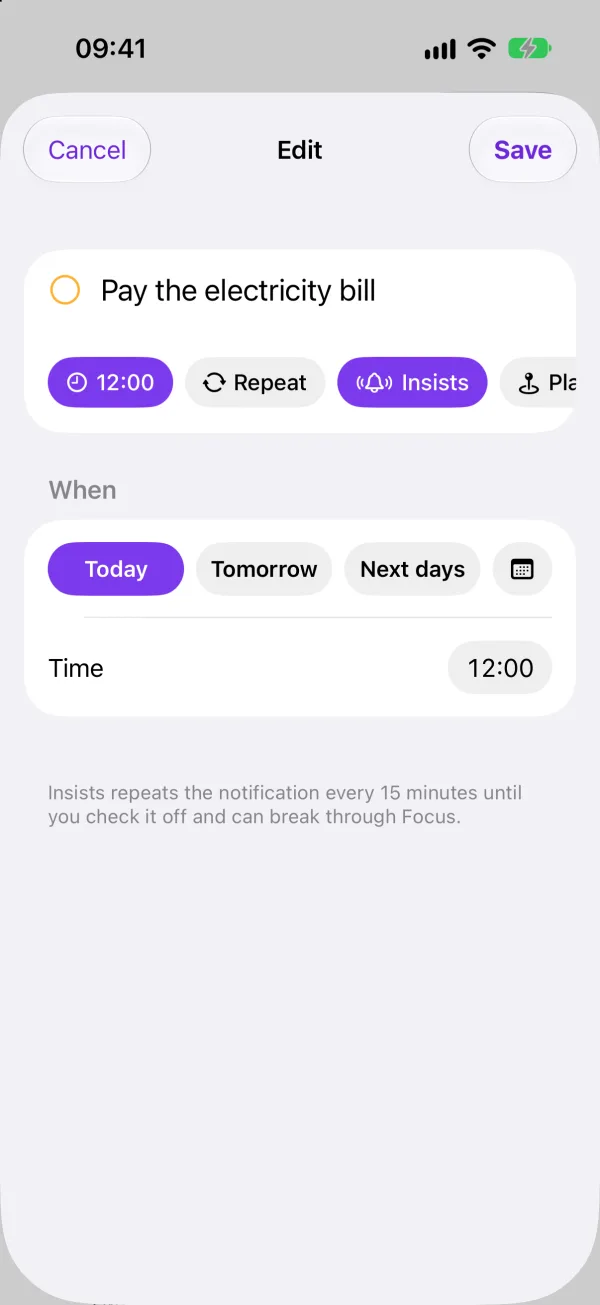
For pills and payments: a Time Sensitive nudge every 15 minutes until you check it off.
“Hey Siri, add a reminder in Pixuno.” Or set up a Shortcut or the Action button to add one in a tap.
Your streak, what you finish most and what you keep moving to tomorrow. Calculated on your iPhone.
13 check-off sounds, from a quiet tick to real French bulldog barks, snorts and snores. Plus a CSV export of everything.
A red number on the icon for today, overdue or both. Or none, if red numbers stress you out.
Notifications
A summary in the morning. In the evening, only if something is left. Now and then, a word from Rocco. Times are yours to choose and there's a Plain tone if you'd rather not be entertained.
Good morning9:003 things today, starting with Team standup, Call mom.
Still on your list20:002 left. Tomorrow-you says thanks in advance.
Ana's birthday is tomorrow9:00Cake is optional. Remembering isn't.
Rocco's moods
Plain and Witty are free. The others are Pro. Savage is blunt, never rude.
Two minutes, tops.
Moved to tomorrow. Good call.
Moving the gym to tomorrow again? Sure. Your call.
Ignoring this won't make it go away. I checked.
Appearance
Follow your iPhone or pick Light or Dark. Choose an app icon from the original stacked cards, black and white versions, minimal outlines or Rocco in five colors.

Pricing
No subscription. Pay once and Pro is yours on every iPhone with your Apple Account.
0 €
Pay once. Yours forever.
2,99 €1,99 € instead of 2,99 € once
Christmas price until December 24, then 2,99 €.
Price in the euro area. The App Store shows the price for your country.
Privacy by design
No account, no server, no analytics, no ads. Reminders, calendar events, birthdays and places stay on your iPhone, or in your own iCloud if you turn on iCloud Sync. We never see them.
Pixuno at a glance
Pixuno is on the App Store for iPhone (iOS 17 and later) and on Google Play for Android (8.0 and later). Free to download, Pro is one payment for life.